1. The Relational Model & Relational Algebra
TL;DR — Flat files break down when you need data integrity, concurrent access, and durability. The relational model (Ted Codd, 1969) separates the logical structure of data from its physical storage, giving us data independence. Relations (tables) hold unordered sets of tuples (rows), linked by primary and foreign keys. Relational algebra provides the primitive operations — select, project, union, join, etc. — that underpin SQL and query optimization.
What Is a Database?
A database is an organized collection of inter-related data that models some aspect of the real world. Think of a digital music store that needs to keep track of artists and the albums those artists have released. That’s a database — it has two entities (Artists and Albums) with a relationship between them.
Computer science, at a high level, is about taking in some input, performing some operations, and producing output. Databases sit at the heart of almost every application doing exactly that.
People often confuse “databases” with “database management systems.” A database management system (DBMS) is the software that manages a database — it handles inserting, deleting, querying, and updating data. MySQL, PostgreSQL, Oracle, and MongoDB are all DBMSs, not databases. The database is the data itself; the DBMS is the program that lets you work with it.
The Flat File Strawman
Before we appreciate why relational databases exist, let’s see the simplest possible approach: store each entity as a comma-separated value (CSV) file and write application code to manage it. Each entity gets its own file — an artists.csv and an albums.csv.
Here’s what our artists file might look like:
"Wu-Tang Clan",1992,"USA"
"Notorious BIG",1992,"USA"
"GZA",1990,"USA"
Now say we want to find the year that GZA went solo. We’d have to write code that opens the file, reads every line, parses the CSV, and checks for a match:
for line in file.readlines():
    record = parse(line)
    if record[0] == "GZA":
        print(int(record[1]))
This works for a toy example. But as soon as you try to build a real application on top of flat files, three categories of problems emerge:
Data integrity. How do you ensure that the artist name is consistent across every album entry? What if somebody accidentally overwrites the album year with an invalid string like "hello"? What if there are multiple artists on a single album — how do you represent that in a CSV? What happens if you delete an artist that still has albums pointing to them? With flat files, the answer to all of these is: your application code has to handle it manually, and you’ll probably get it wrong.
Implementation. How do you find a particular record without scanning the entire file? What if you want to build a second application that uses the same data — do you copy the file? What if that application runs on a different machine? And the critical one: what if two threads try to write to the same file at the same time? You’ll get corrupted data with no way to recover.
Durability. What if the machine crashes halfway through updating a record? The file is now in a partially written state, and you’ve lost data. What if you want to replicate the database across multiple machines for high availability? Some systems sacrifice safety by default to make operations appear faster — but that’s a dangerous tradeoff when real data is on the line.
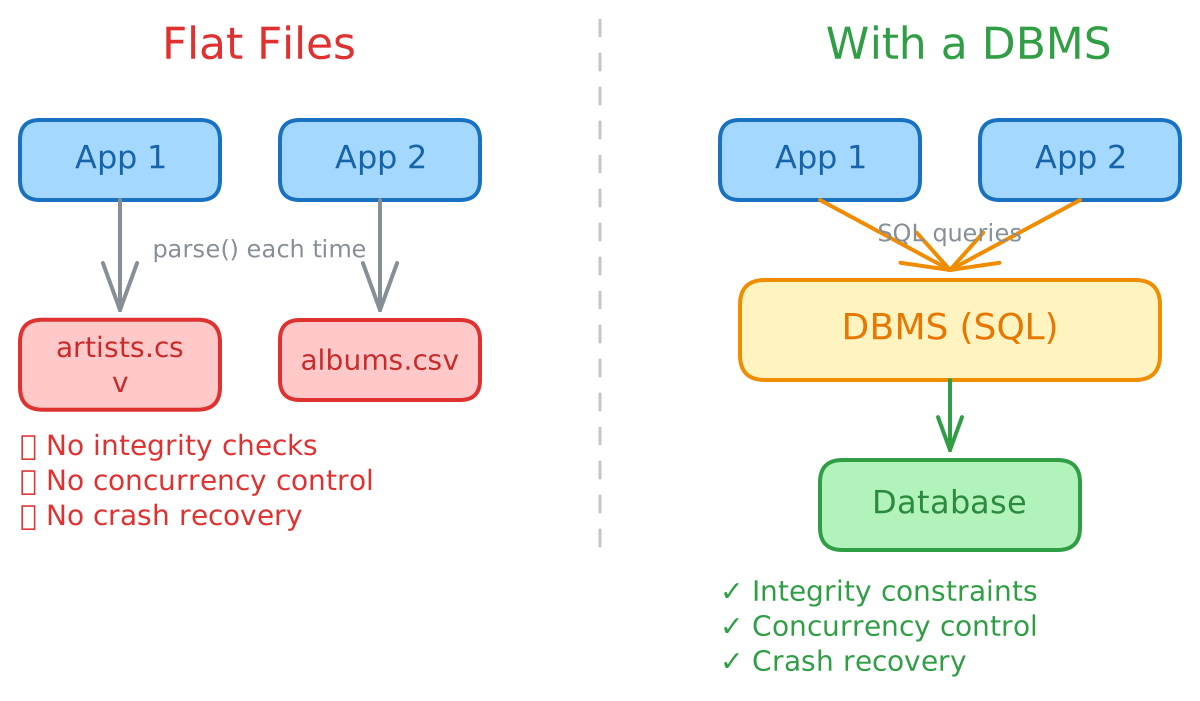
These aren’t hypothetical problems. Every real system that has ever tried to store important data in flat files has eventually hit all three. The solution is to stop managing data yourself and hand the responsibility to a dedicated piece of software: a DBMS.
The DBMS and Data Models
A general-purpose DBMS supports the definition, creation, querying, update, and administration of databases in accordance with some data model.
A data model is a collection of concepts for describing the data in a database — the rules that define what types of things can exist and how they relate to each other. Think of it as the vocabulary you use to talk about your data.
A schema is a description of a particular collection of data using a given data model. It defines the structure your data must follow. Without a schema, you just have random bits with no meaning.
There are many data models, each suited to different use cases:
| Data Model | Use Case | Examples |
|---|---|---|
| Relational | Most applications | PostgreSQL, MySQL, Oracle |
| Key/Value | Caching, simple lookups | Redis, DynamoDB |
| Document | Nested/hierarchical data | MongoDB, CouchDB |
| Graph | Relationships as first-class | Neo4j |
| Vector | Similarity search on embeddings | Pinecone, pgvector |
The relational model is by far the most common and the most important to understand. But to appreciate why it was revolutionary, we need to understand what came before it.
The Problem with Early Databases
In the late 1960s, the first database management systems appeared — systems like IDS, IMS, and CODASYL. They were a huge step up from flat files, but they had a fundamental problem: queries were procedural.
To retrieve data, a developer had to write code that manually navigated the database’s internal data structures. You had to explicitly tell the system how to traverse the data — which record to start from, which pointer to follow, in what order. It was like giving turn-by-turn directions instead of just saying where you want to go.
Here’s what a query looked like in CODASYL to find all artists on a particular album:
PROCEDURE GET_ARTISTS_FOR_ALBUM;
BEGIN
  FIND ALBUM USING ALBUM.NAME = "Mooshoo Tribute"
  FIND FIRST APPEARS WITHIN APPEARS_ALBUM
  REPEAT
    FIND OWNER WITHIN ARTIST_APPEARS
    DISPLAY ARTIST_RECORD.NAME;
    FIND NEXT APPEARS WITHIN APPEARS_ALBUM
  END REPEAT;
END PROCEDURE;
This is painful for several reasons. First, the developer has to understand the physical structure of the database — which sets exist, how they’re linked, what the navigation paths are. Second, if the database structure changes (say you add an index, or reorganize how albums are stored), every query that navigates that structure breaks. You have to rewrite your code.
And third — this is the killer — the execution plan is hard-coded. The developer baked in assumptions about the data (its size, distribution, ordering) that might hold today but could change tomorrow. As the data grows, these queries become inefficient or even incorrect, and there’s nothing you can do short of rewriting them.
Compare that to the same query in SQL:
SELECT artist.name
  FROM artist, appears, album
 WHERE artist.id = appears.artist_id
   AND appears.album_id = album.id
   AND album.name = 'Mooshoo Tribute'
This says what we want — the names of artists who appear on this album — without saying how to get it. The DBMS figures out the best way to execute it. That shift from procedural to declarative is the core contribution of the relational model.
The Relational Model
In the late 1960s, Ted Codd at IBM Research watched developers rewriting their entire DBMS every time they wanted to change the physical layer — how data was stored on disk, how indexes were organized, how records were laid out in memory. He realized the problem was that applications were tightly coupled to the physical representation of data.
In 1969, he proposed the relational model as a solution. The key insight was to introduce a clean separation between the logical structure of data and its physical storage. The model defines three pillars:
Structure — Data is organized into relations (what we call tables). Each relation is defined by a set of attributes (columns), and each attribute has a domain — the set of allowed values. Crucially, this definition is independent of how the data is physically stored. You describe what the data looks like, not where or how it lives on disk.
Integrity — The database must satisfy certain constraints at all times. For example, a person’s age cannot be negative. An album must reference an artist that actually exists. These rules are declared once in the schema, and the DBMS enforces them automatically — you don’t have to write validation logic in your application.
Manipulation — Instead of navigating data structures procedurally, you use a declarative API to describe the result you want. The DBMS decides the most efficient way to compute that result. You say “give me all albums by GZA released after 1993,” and the system figures out whether to use an index scan, a sequential scan, or some other strategy.
Data Independence
This is the single most important property of the relational model. Data independence means that applications are isolated from how data is physically represented. The user only thinks about high-level application logic. Under the hood, the DBMS optimizes the physical layout — how data is arranged on disk, which indexes exist, how pages are organized — according to the operating environment, database contents, and workload.
The beautiful part: the DBMS can re-optimize when any of these factors change. You add more data? The optimizer adjusts. You deploy on faster hardware? It adjusts. You change access patterns? It adjusts. And through all of this, your application code doesn’t change at all. A change in the physical data will not break your applications. This was the revolution.
Relations and Tuples
A relation is an unordered set that contains the relationship of attributes representing entities. The fact that it’s unordered is important — since the relational model doesn’t prescribe any particular ordering, the DBMS is free to store tuples in whatever physical order is most efficient. This is what enables optimization.
A tuple is a set of attribute values (also called its domain) in the relation. Historically, values had to be atomic — simple scalars like integers, strings, dates. Modern systems have relaxed this, allowing lists, JSON, and nested structures. Every attribute can also take the special value NULL, meaning the value is undefined for that tuple.
A relation with n attributes is called an n-ary relation. In everyday terms: a table with n columns.
Primary Keys, Foreign Keys, and Constraints
A primary key uniquely identifies a single tuple in a relation. If you don’t define one, some DBMSs will automatically create an internal primary key for you. Most systems support auto-generating unique values via:
IDENTITY(SQL Standard)SEQUENCE(PostgreSQL, Oracle)AUTO_INCREMENT(MySQL)
A foreign key specifies that an attribute from one relation maps to a tuple in another relation — it typically points to a primary key. This is how relations reference each other. For example, an albums table might have an artist_id column that points to the id column in the artists table.
CREATE TABLE artist (
    id    INT PRIMARY KEY,
    name  VARCHAR NOT NULL,
    year  INT,
    country CHAR(60),
    CHECK (year > 1900)
);

CREATE TABLE album (
    id        INT PRIMARY KEY,
    name      VARCHAR NOT NULL,
    artist_id INT REFERENCES artist(id),
    year      INT
);
A constraint is a user-defined condition that must hold for any instance of the database. The CHECK (year > 1900) above is a constraint — the DBMS will reject any insert or update that violates it. Unique key and referential (foreign key) constraints are the most common, but you can define custom rules too.
Procedural vs. Declarative: DMLs
The API that a DBMS exposes to applications for storing and retrieving data is called a Data Manipulation Language (DML). There are two fundamentally different approaches:
Procedural DMLs require the query to specify the execution strategy. You tell the system how to find the data — scan this file, follow this pointer, loop through these records, count the matches. The early CODASYL code above is procedural. So is writing Python loops over a CSV.
Declarative DMLs require the query to specify only what data is wanted. You say “count all the artists” and the system decides whether to use an index, scan the table, or use a cached result. SQL is declarative.
The declarative approach is strictly more powerful — not because it can express more queries, but because it gives the DBMS freedom to choose the best execution plan. A procedural query locks you into one strategy. A declarative query lets the optimizer pick from many strategies and choose the fastest one for the current state of the data.
Relational Algebra
Now we get to the mathematical foundation that makes all of this work. Relational algebra is a set of fundamental operations to retrieve and manipulate tuples in a relation. Each operator takes one or more relations as input and outputs a new relation. Because the output is always a relation, you can chain operators together to build arbitrarily complex queries.
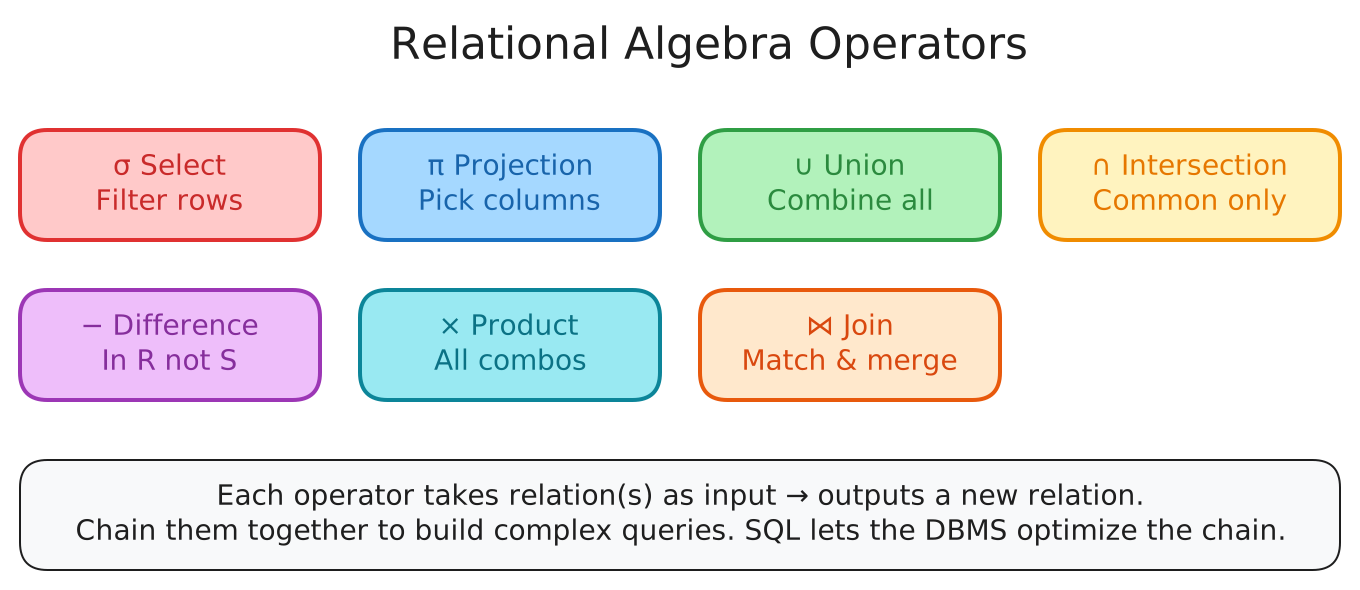
Select (σ)
Takes a relation and outputs a subset of its tuples that satisfy a selection predicate. The predicate acts as a filter — you can combine multiple conditions with AND/OR.
-- σ_{a_id='a2'}(R)
SELECT * FROM R WHERE a_id = 'a2';
Projection (π)
Takes a relation and outputs a new relation containing only the specified attributes. You can also rearrange column ordering and derive new computed values.
-- π_{b_id-100, a_id}(σ_{a_id='a2'}(R))
SELECT b_id - 100, a_id FROM R WHERE a_id = 'a2';
Union (∪)
Combines two relations and outputs all tuples that appear in at least one of them. Both input relations must have the exact same attributes.
(SELECT * FROM R) UNION ALL (SELECT * FROM S);Intersection (∩)
Outputs only the tuples that appear in both input relations. Again, both must have the same attributes.
(SELECT * FROM R) INTERSECT (SELECT * FROM S);Difference (−)
Outputs tuples that appear in the first relation but not in the second.
(SELECT * FROM R) EXCEPT (SELECT * FROM S);Product (×)
Outputs all possible combinations of tuples from both relations. If R has 3 rows and S has 3 rows, the result has 9 rows. This is rarely used alone — it’s usually combined with a selection to form a join.
SELECT * FROM R CROSS JOIN S;Join (⋈)
The most important operator in practice. Takes two relations and outputs all tuples that are a combination of one tuple from each relation, where they share common values on one or more attributes. A join is essentially a product followed by a select — but the DBMS can implement it far more efficiently.
SELECT * FROM R NATURAL JOIN S;
SELECT * FROM R JOIN S USING (a_id, b_id);
The Key Insight: Order Matters (But You Shouldn’t Care)
Here’s why relational algebra matters beyond theory. Consider two ways to write the same query:
σ_{b_id=102}(R ⋈ S)— join R and S first (potentially billions of combined rows), then filter for b_id = 102R ⋈ (σ_{b_id=102}(S))— filter S down to the one matching row first, then join with R
Both produce the exact same result. But if S has a billion tuples and only one has b_id = 102, the second version is astronomically faster — it joins R against a single row instead of a billion.
In a procedural language like Pandas, you have to figure this out. You write the execution order, and if you get it wrong, your query takes hours instead of milliseconds. There’s no safety net.
In SQL, you just write:
SELECT * FROM R JOIN S USING (a_id, b_id)
 WHERE S.b_id = 102;
The DBMS’s query optimizer examines both strategies (and many more), estimates their cost based on data statistics, and picks the fastest one. This is the power of declarative languages built on relational algebra: you describe what you want, and the system handles the how. It’s why SQL has been the dominant query language for over 50 years.
Beyond Relational: Other Data Models
The relational model dominates, but other models exist for specialized use cases.
Document Model
Instead of spreading data across multiple tables linked by foreign keys, the document model stores everything about an entity in a single nested document — typically JSON.
{
  "name": "GZA",
  "year": 1990,
  "albums": [
    { "name": "Liquid Swords", "year": 1995 },
    { "name": "Beneath the Surface", "year": 1999 }
  ]
}
This avoids the “object-relational impedance mismatch” — the awkward translation between your application’s objects and flat database rows. In the relational model, you’d need three tables (artists, albums, artist_album) and joins to reconstruct this. In the document model, it’s all in one place.
The tradeoff: you lose the relational model’s integrity guarantees and powerful join/query capabilities. If you need to query across documents or enforce constraints between them, you’re back to writing application code — the same problem flat files had.
Vector Model
Vector databases store one-dimensional arrays (embeddings) and support nearest-neighbor search. They’re used for semantic search on embeddings generated by ML transformer models — you feed text through a model like OpenAI’s, get a vector, and search for similar vectors in the database.
At their core, these systems use specialized indexes like HNSW (Hierarchical Navigable Small World) and IVFFlat to perform approximate nearest-neighbor searches quickly. The vector model is not a radical departure from existing architectures — every major relational DBMS now ships native vector index support (e.g., pgvector for PostgreSQL). Dedicated vector databases like Pinecone mainly offer tighter integration with the AI tooling ecosystem (LangChain, OpenAI APIs, etc.).