3. Database Storage (Part I)
TL;DR — A disk-oriented DBMS stores its data in fixed-size pages on non-volatile disk, using a buffer pool to shuttle pages into memory on demand. Pages are internally organized with slotted arrays that map slots to tuple offsets, and each tuple is a byte sequence whose attributes must be word-aligned. The system must carefully manage disk I/O because the latency gap between memory and disk is enormous — an L1 cache read is ~1 ns while an SSD read is ~16,000 ns; scaled proportionally, that’s one second versus 4.4 hours.
The Storage Hierarchy
Every DBMS is built on top of a hardware reality: storage devices form a hierarchy. At the top sit CPU registers and caches — blazingly fast, tiny, and expensive. Below them is DRAM, which is what we casually call “memory.” Further down are SSDs and HDDs, which we collectively call “disk.” The further you move from the CPU, the larger and cheaper the storage gets, but the slower it becomes.
There is a critical dividing line in this hierarchy:
- Volatile (registers, caches, DRAM) — loses contents when power is cut. Supports fast random access at byte granularity: a program can jump to any byte address and read it directly.
- Non-volatile (SSDs, HDDs, network storage) — retains data across restarts. Is block-addressable: to read a single byte, you must first load the entire 4 KB page that contains it.
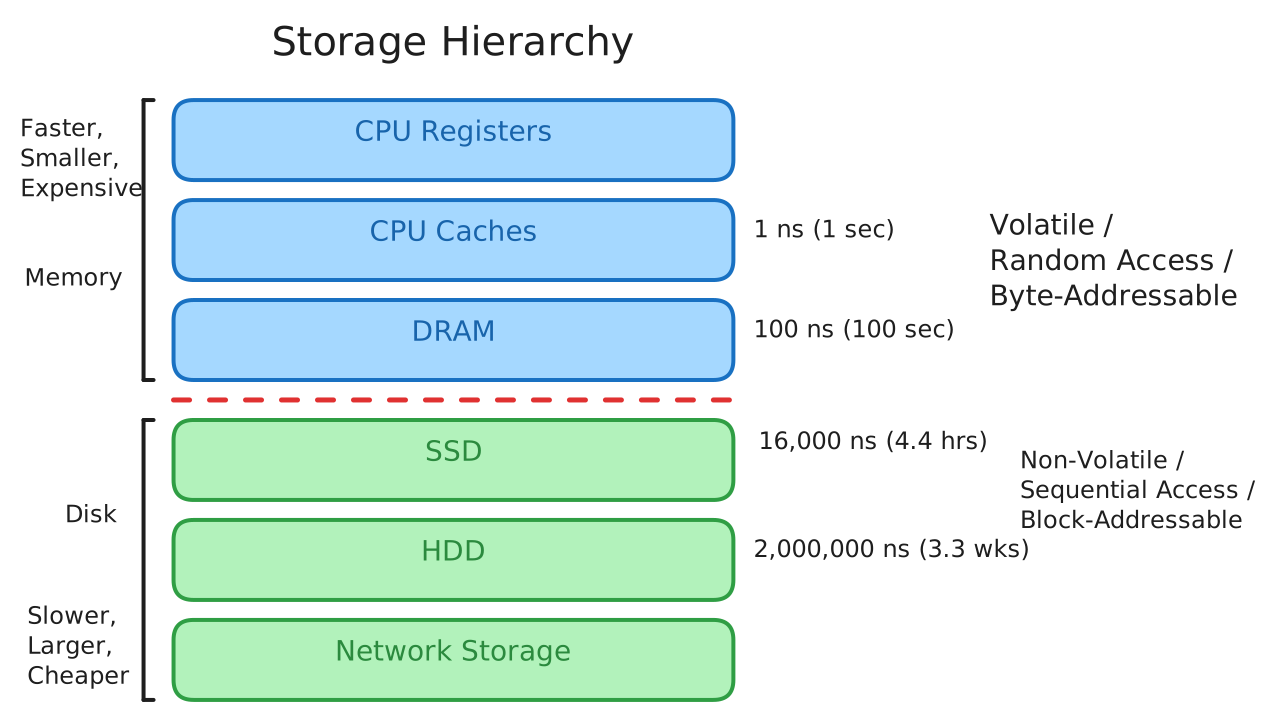
The latency differences across this hierarchy are staggering. In absolute terms:
- L1 cache — ~1 ns
- L2 cache — ~4 ns
- DRAM — ~100 ns
- SSD — ~16,000 ns
- HDD — ~2,000,000 ns
- Network storage — ~50,000,000 ns
Those raw numbers are hard to internalize, so here is a useful thought experiment: scale everything up so that 1 ns = 1 second. Under that analogy, an L1 cache read takes one second, DRAM takes 100 seconds, an SSD read takes 4.4 hours, an HDD read takes 3.3 weeks, and network storage takes 1.5 years. The numbers are relative — the ratios are what matter — and they dictate nearly every design decision in a DBMS.
There are two major access patterns on storage devices: random access (jumping to an arbitrary location) and sequential access (reading contiguous blocks). On non-volatile storage, random access is almost always slower than sequential access — random I/O on an SSD costs roughly 80–100 μs versus 10–100 μs for sequential I/O. Because of this, DBMS algorithms try to maximize sequential access, storing data in contiguous blocks and allocating multiple pages at a time (called an extent).
System Design Goals
With these hardware realities in mind, a disk-oriented DBMS has three overarching design goals:
- Support databases larger than memory — you cannot assume everything fits in DRAM.
- Manage disk I/O carefully — every disk read or write is expensive, so the system must minimize stalls.
- Maximize sequential access — random I/O on disk is dramatically slower than sequential I/O.
Disk-Oriented DBMS Overview
The database lives on disk, organized into files composed of fixed-size pages. The first page in a file is typically a directory page that tracks where everything else is. When the execution engine needs to process a query, it asks for a specific page by its page ID. The buffer pool — a region of memory that acts as a cache — handles the mechanics of fetching that page from disk (if it is not already resident) and returns a pointer to the in-memory copy. The execution engine then reads or modifies the page in place, and the buffer pool is responsible for eventually writing dirty pages back to disk.
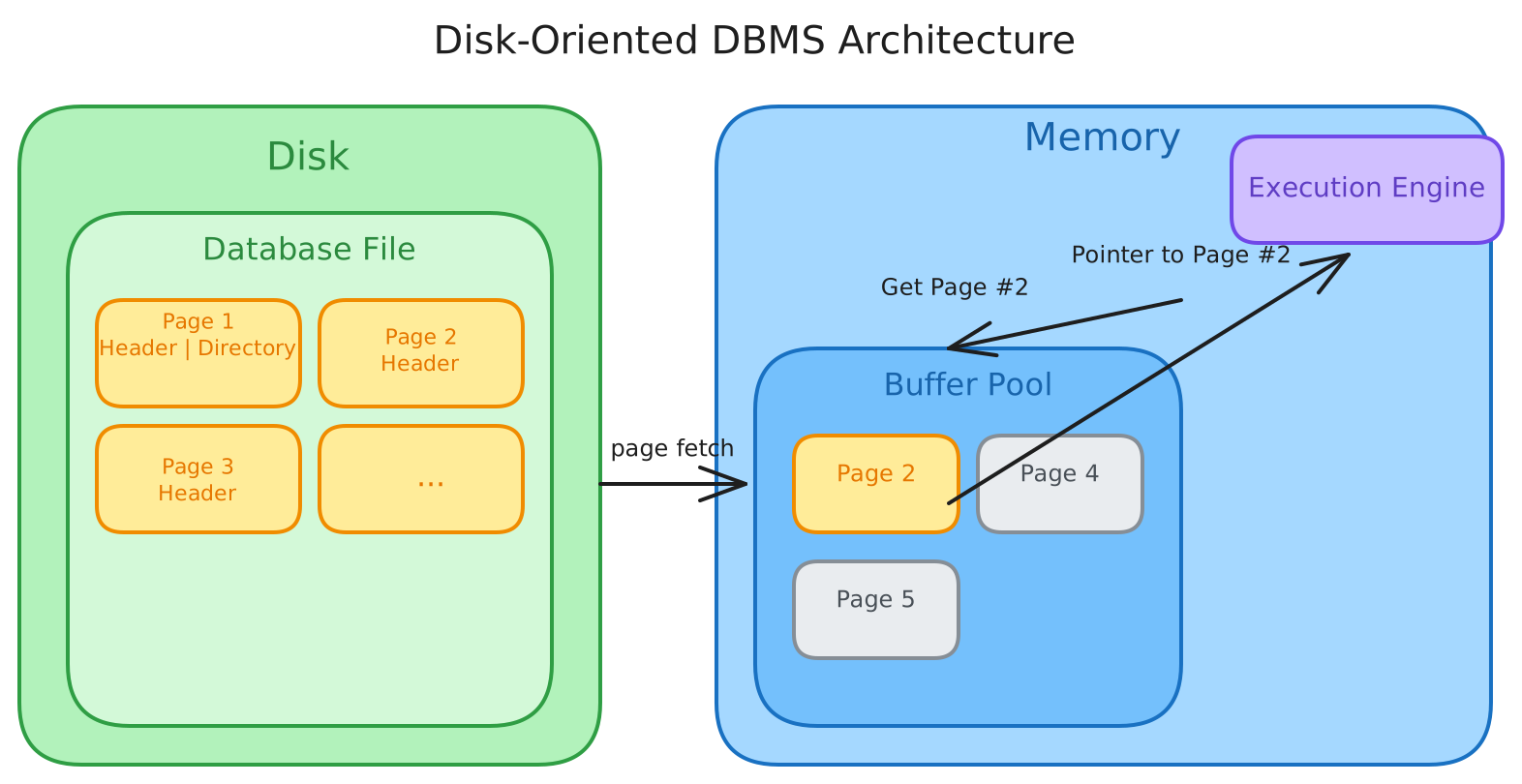
This architecture cleanly separates concerns: the disk manager deals with files, the buffer pool deals with caching, and the execution engine deals with query logic. Each layer will be covered in depth across multiple lectures — storage in this one, buffer pool management later.
Why Not Let the OS Handle It?
This whole setup might remind you of virtual memory: the OS already provides a large address space and pages data in from disk transparently. One could use mmap to map a database file into the process’s address space and let the OS handle paging. The problem is that when mmap hits a page fault, the process blocks — the DBMS has no control over which pages are evicted, when I/O happens, or how to prioritize queries.
The DBMS knows far more about its data and access patterns than the OS ever could. It knows which pages will be needed next (because it has the query plan), which pages are dirty, and which can be safely evicted. Handing this responsibility to the OS means giving up that intelligence.
There are a few OS primitives that can help at the margins:
madvise— hint to the OS about upcoming read patterns.mlock— pin specific pages in memory so the OS cannot evict them.msync— force dirty pages to be flushed to disk.
But the consensus in the database community is clear: do not use mmap in a DBMS if you need writes. The operating system is not your friend.
File Storage
At the lowest level, a DBMS stores its database as one or more files on disk. Some systems use a file hierarchy; others pack everything into a single file (like SQLite). Traditionally these files use a proprietary format that only the specific DBMS can interpret — the OS sees them as opaque blobs of bytes. More recently, portable open-spec file formats have emerged that allow different DBMSs to read and write from the same files.
The DBMS typically runs on top of the standard filesystem provided by the OS, though some high-end enterprise systems (like Oracle with ASM) inject a custom filesystem. The key abstraction is the storage manager, which is responsible for maintaining the database’s files. Its responsibilities include:
- Representing files as collections of pages.
- Tracking what data has been read or written.
- Monitoring how much free space remains.
Replication is not handled at the storage manager level — it happens either below (e.g., RAID in the filesystem) or above (e.g., logical replication of tuples).
Database Pages
The DBMS organizes its data into fixed-size blocks called pages. A page can contain:
- Tuples (table data)
- Index entries
- Metadata
- Log records
Most systems do not mix types within a single page. Some systems require pages to be self-contained — all the information needed to interpret the page must be stored within it.
Each page gets a unique page ID. If the database is a single file, the page ID can simply be the file offset. In more complex setups, the DBMS uses an indirection layer that maps page IDs to file paths and offsets. When the upper layers of the system request page number N, the storage manager translates that into a specific file location and fetches the data.
Most DBMSs use fixed-size pages to avoid the engineering headache of variable-size pages. With variable-size pages, deleting a page could punch a hole in the file that is hard to fill.
There are three distinct notions of “page” at play:
| Concept | Typical Size |
|---|---|
| Hardware page | 4 KB |
| OS page | 4 KB (x64 supports 2 MB / 1 GB huge pages) |
| Database page | 512 B – 32 KB |
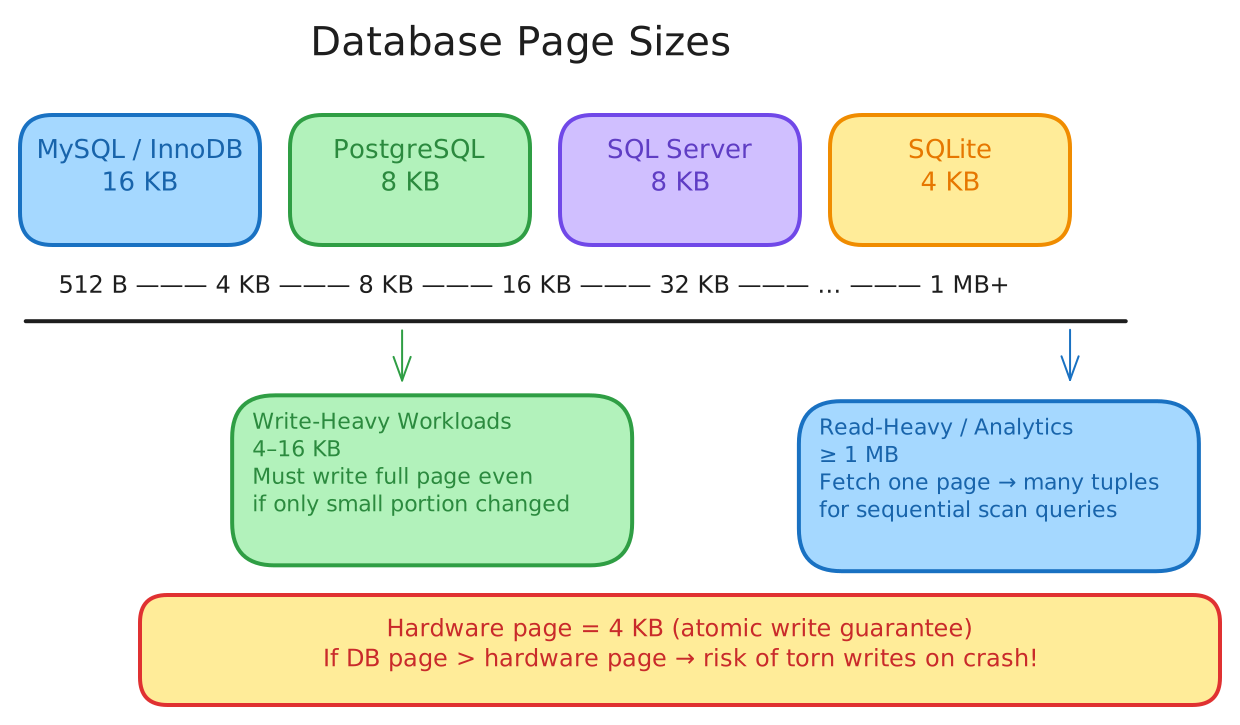
The hardware page is the largest block that the storage device can write atomically. If the hardware page is 4 KB, then a 4 KB write either completes entirely or not at all. If the database page is larger than the hardware page (say, 16 KB), the DBMS must take extra precautions — a crash partway through writing a 16 KB page could leave it in a torn, half-written state.
The optimal database page size depends on the workload. Read-heavy systems (analytical workloads) tend to use larger pages (1 MB or more) because fetching a single page brings in many tuples. Write-heavy systems prefer smaller pages (4–16 KB) because the system must write the entire page even if only a small portion changed.
Heap File Organization
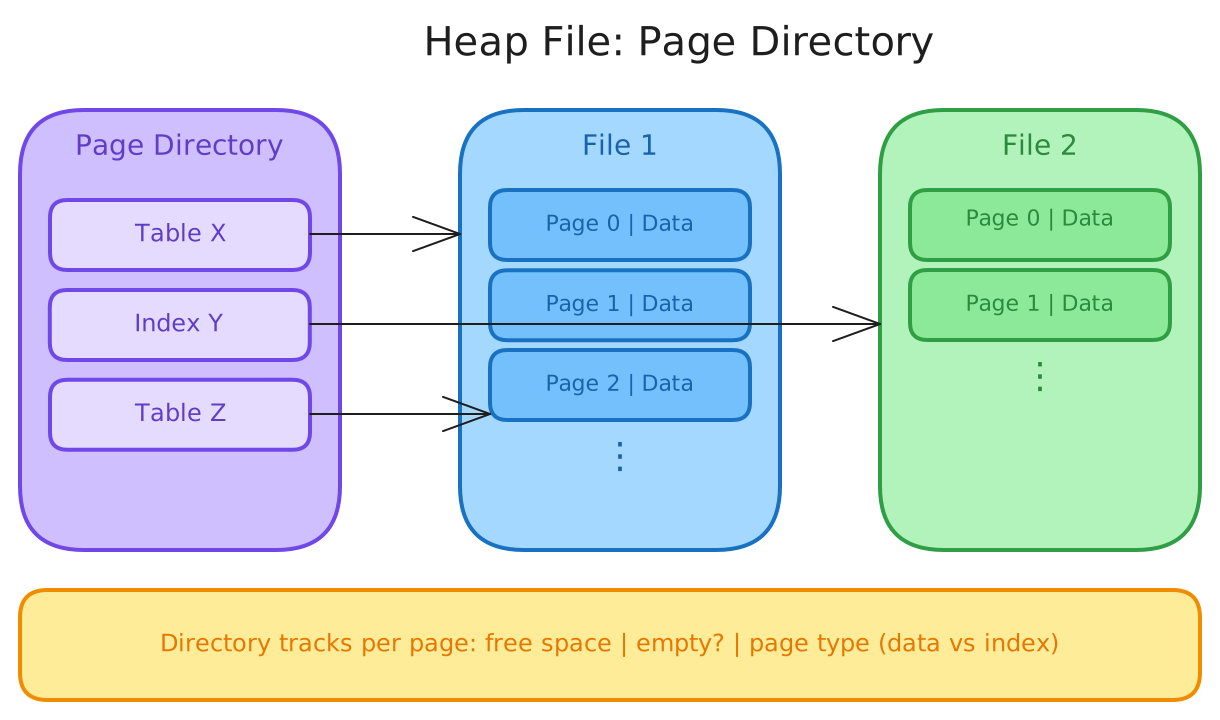
There are several ways to manage pages in files — tree file organization, ISAM, hashing — but the most fundamental is the heap file. A heap file is simply an unordered collection of pages where tuples are stored in random order. It supports creating, reading, writing, and deleting pages, as well as iterating over all pages.
To locate a page on disk given a page ID, the DBMS uses a page directory: special pages that contain one entry per database object (data pages, index pages, etc.). The directory must be kept in sync with the actual data pages. The DBMS also tracks metadata about each page — how much free space it has, whether it is empty, and what type of data it holds.
Page Layout
Every page begins with a header containing metadata about its contents:
- Page size
- Checksum (for integrity verification)
- DBMS version
- Transaction visibility information
- Compression metadata (if applicable)
- Schema information (in self-contained systems like Oracle)
Some systems require pages to be fully self-contained, so the header includes everything needed to interpret the page independently.
The question then becomes: how do we organize the actual data inside a page? For tuple-oriented (row) storage, there are two main approaches discussed here: a naive strawman and the real solution.
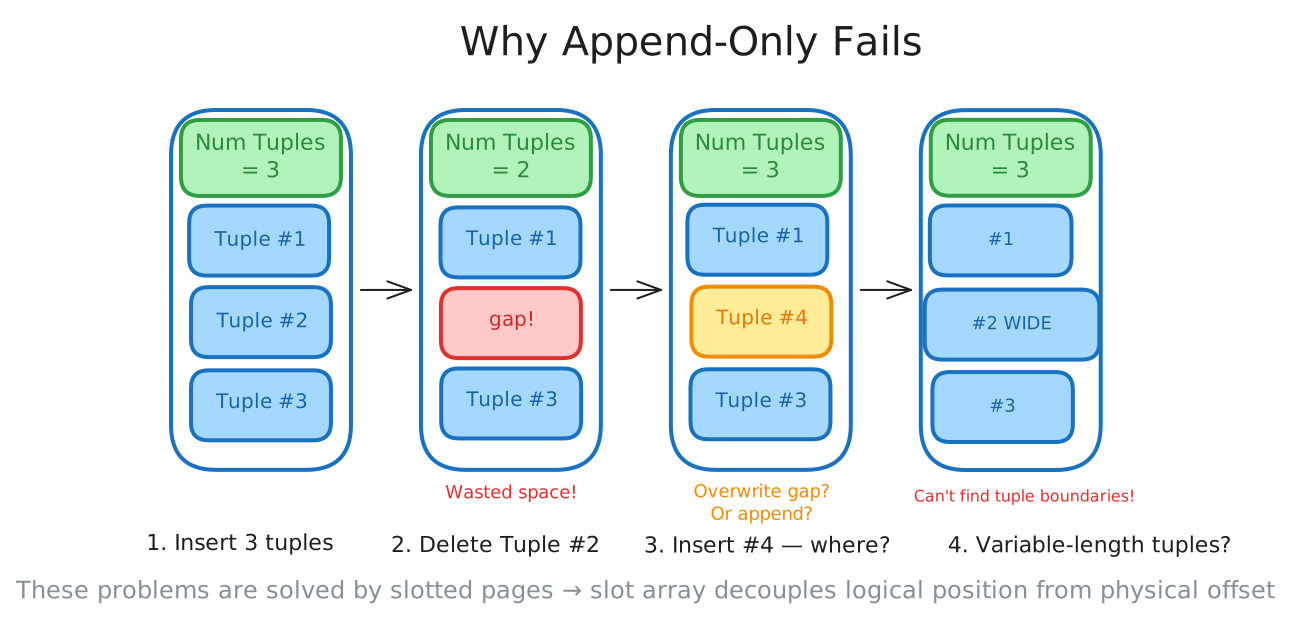
The Strawman: Append-Only
The simplest idea is to keep a count of tuples in the page header and just append each new tuple to the end. This works fine for inserts, but it falls apart quickly. If you delete a tuple in the middle, you leave a gap — wasted space that the DBMS can’t easily reclaim. Should the next insert scan forward to find and fill that gap? And if tuples have variable-length attributes, there’s no way to jump directly to tuple N without scanning from the beginning, because you don’t know where each tuple’s data ends and the next one begins.
Slotted Pages
The real solution, used by the vast majority of DBMSs today, is slotted pages. A slotted page has a header, a slot array that grows from the front of the page, and tuple data that grows from the back. Each slot in the array records the offset of a tuple within the page.
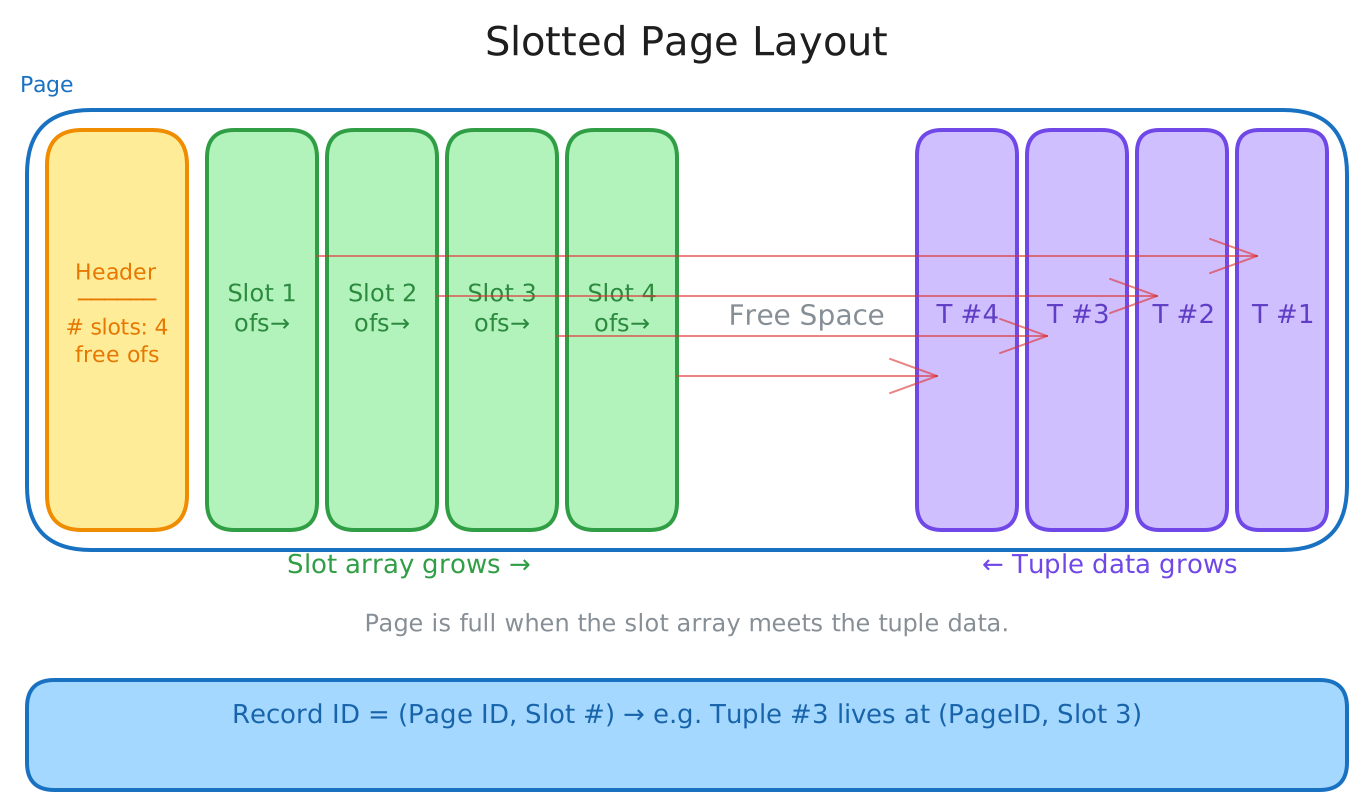
The header tracks the number of used slots and the offset of the last used slot. When a new tuple is inserted, a new slot entry is appended to the array (growing toward the end) and the tuple data is written starting from the back of the page (growing toward the beginning). The page is considered full when the slot array and the tuple data would overlap.
This scheme elegantly solves the problems that the strawman approach could not:
- Deletions — just clear a slot entry; no gaps to scan over.
- Variable-length tuples — each slot simply points to wherever the tuple starts.
- Stable references — a tuple can be identified by its slot number within the page.
Record IDs
The DBMS assigns each logical tuple a unique record identifier that encodes its physical location — typically a combination of file ID, page ID, and slot number. Most DBMSs do not store the record ID inside the tuple itself (SQLite is a notable exception, where ROWID is the true primary key stored as a hidden attribute). Record ID sizes vary across systems — from 4 bytes in MySQL’s InnoDB to 10 bytes in Oracle.
Because record IDs reflect physical locations, they can change when tuples are moved (e.g., during compaction). Applications should never rely on these IDs to have any stable meaning.
Tuple Layout
A tuple is a sequence of bytes. It is the DBMS’s job to interpret those bytes as typed attribute values using the schema stored in the system catalog. Each tuple is prefixed with a header that contains:
- Visibility information for concurrency control (which transaction created or last modified this tuple).
- A null bitmap indicating which attributes are
NULL.
Notably, the header does not store the table schema — that information lives in the system catalog and is looked up separately.
After the header, the tuple data section stores the actual attribute values, typically in the order they were declared in the CREATE TABLE statement. This ordering is chosen for simplicity, though it might not be optimal for alignment (more on that next).
Data Representation
Different data types are stored differently inside a tuple:
| Type | Storage Format |
|---|---|
INTEGER / BIGINT / SMALLINT / TINYINT | Native C/C++ format |
FLOAT / REAL | IEEE-754 (fast but inexact) |
NUMERIC / DECIMAL | Fixed-point, arbitrary precision (exact but slower) |
VARCHAR / TEXT / BLOB | Length-prefixed header + data bytes, or pointer to overflow page |
TIMESTAMP / DATE | 32/64-bit integer of micro/milliseconds since Unix epoch |
The distinction between FLOAT and NUMERIC is important. Floating-point types use the CPU’s native IEEE-754 instructions, which are fast but introduce rounding errors. The classic demonstration: in C, computing 0.1 + 0.2 with float precision and printing 20 decimal places gives 0.30000001192092895508 instead of 0.3. When rounding errors are unacceptable (e.g., financial data), you must use NUMERIC / DECIMAL, which stores values in an exact representation — Postgres, for example, uses a struct with digit count, weight, scale, sign, and a digit array.
Word Alignment
All attributes in a tuple must be word-aligned so the CPU can access them efficiently. On a 64-bit system, the CPU reads 8-byte words. If a 4-byte INT is followed by a 2-byte CHAR(2), the next attribute might start at a misaligned offset.
Consider this table:
CREATE TABLE foo (
    id       INT PRIMARY KEY,   -- 32 bits
    cdate    TIMESTAMP,         -- 64 bits
    color    CHAR(2),           -- 16 bits
    zipcode  INT                -- 32 bits
);
Laid out naively, id (32 bits) is followed by cdate (64 bits), which straddles a word boundary. There are two solutions:
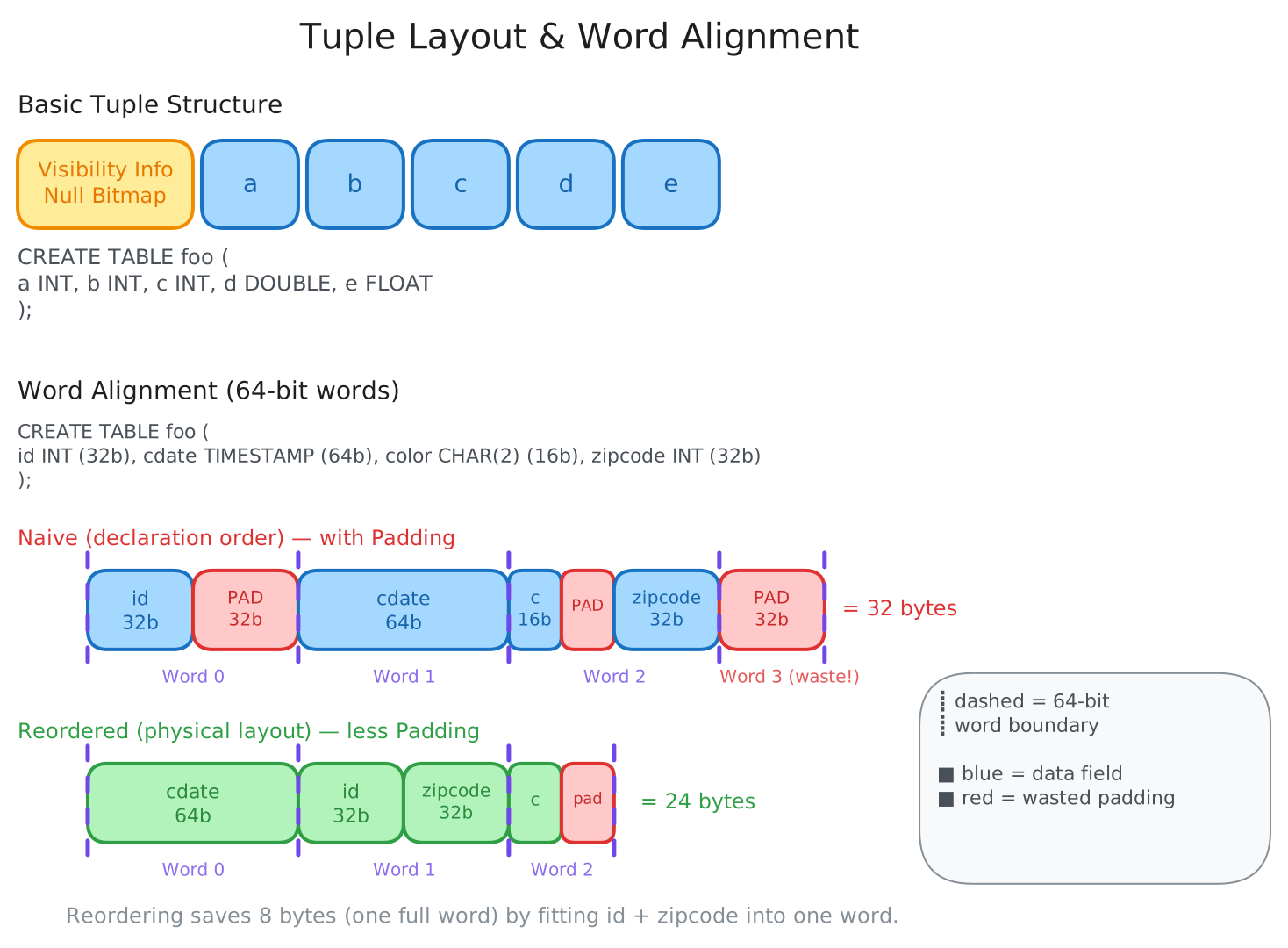
- Padding — insert empty bytes after smaller attributes to round them up to the next word boundary. This wastes space but is straightforward.
- Reordering — rearrange the physical order of attributes in the tuple to minimize wasted padding. For example, placing
cdate(64 bits) first, thenid(32 bits) andzipcode(32 bits) together, thencolor(16 bits) with minimal padding. The physical order in the tuple may differ from the logical order in theCREATE TABLEstatement.
Handling Large Values
Most DBMSs do not allow a single tuple to exceed the size of a page. But what happens when an attribute value is genuinely large — say, a multi-kilobyte TEXT field?
The answer is overflow pages. When a value is too large to fit inline, the DBMS stores it in a separate overflow page and records a pointer (size + location) in the tuple. Different systems have different thresholds for when this kicks in:
- Postgres: TOAST (The Oversized-Attribute Storage Technique), triggers at values > 2 KB.
- MySQL: Overflow for values > ½ the page size.
- SQL Server: Overflow for values > page size.
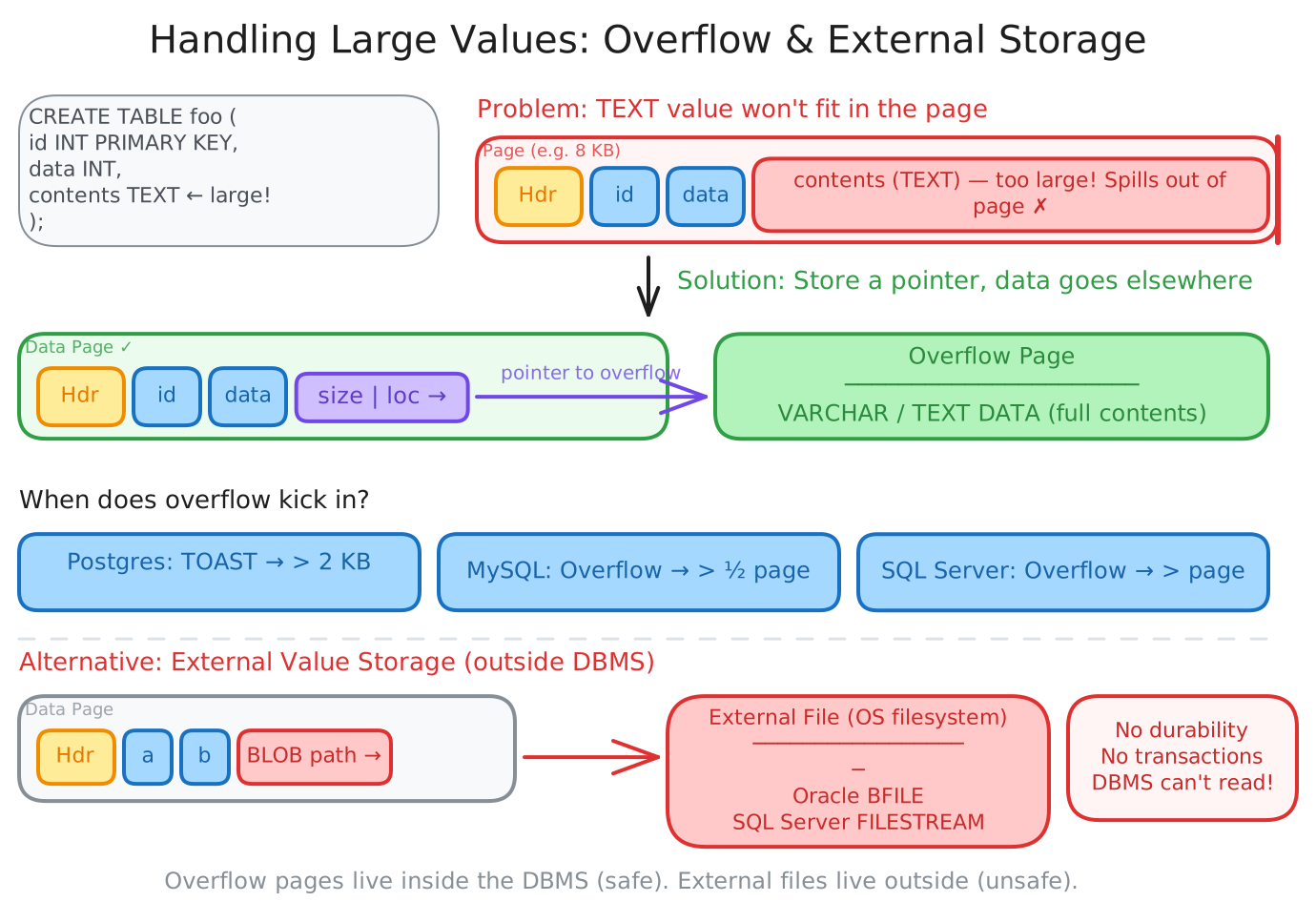
Some systems go even further and allow large values to be stored as external files on the filesystem, treated as BLOB types. Oracle calls this BFILE, SQL Server calls it FILESTREAM. The DBMS cannot manipulate the contents of these external files, so they get no durability or transaction guarantees — they exist outside the DBMS’s control.
Null Data Types
Storing NULL values efficiently is a small but important design decision. There are three common approaches:
- Null column bitmap header — a bitmap in the tuple header where each bit indicates whether the corresponding attribute is
NULL. This is the most common approach in row-stores. - Special values — a sentinel value for each type represents
NULL(e.g.,INT32_MINfor integers). More common in column-stores. - Per-attribute null flag — a flag next to each attribute. This sounds simple but wastes space because the extra bit must be padded for word alignment, turning a 1-bit flag into at least a byte. Generally discouraged.
Conclusion
A disk-oriented DBMS organizes its database into fixed-size pages stored in files on disk. The storage manager represents these files as collections of pages, tracked by a page directory. Within each page, the slotted page layout uses a slot array to map logical slots to physical tuple offsets, gracefully handling variable-length data and deletions. Each tuple is a header-prefixed byte sequence where attributes are stored in declaration order and must be word-aligned. For values too large to fit in a page, the system falls back to overflow pages or external storage. Every design choice — from page sizes to alignment strategies — is driven by the enormous latency gap between memory and disk.