2. Modern SQL
TL;DR — SQL started as IBM’s SEQUEL in 1972 and evolved through decades of standards into the rich, declarative language we use today. Beyond simple SELECT/WHERE, modern SQL provides aggregation functions with GROUP BY and HAVING, powerful string and date/time operations, nested subqueries with ALL/ANY/EXISTS, lateral joins that act like per-row for-loops, common table expressions for readable query decomposition, and window functions that compute across related rows without collapsing them.
A Brief History of SQL
The story of SQL begins in 1971 when IBM created its first relational query language called SQUARE. A year later, IBM developed SEQUEL (Structured English Query Language) for its System R prototype DBMS. IBM eventually released commercial SQL-based systems: System/38 in 1979, SQL/DS in 1981, and DB2 in 1983.
The language became an ANSI standard in 1986 and an ISO standard in 1987, at which point the name was shortened to just SQL (Structured Query Language). The minimum syntax a system must implement to claim SQL support is SQL-92, but the standard has continued to evolve with major updates roughly every few years:
| Standard | Key Additions |
|---|---|
| SQL:1999 | Regular expressions, triggers, OO |
| SQL:2003 | XML, window functions, sequences, auto-generated IDs |
| SQL:2008 | Truncation, fancy sorting |
| SQL:2011 | Temporal databases, pipelined DML |
| SQL:2016 | JSON, polymorphic tables |
| SQL:2023 | Property graph queries, multi-dimensional arrays |
Each vendor follows the standard to varying degrees, and every major system ships its own proprietary extensions. But the core language — the part covered by SQL-92 — is remarkably portable.
Relational Languages
SQL is not a single monolithic language. It comprises several sub-languages:
- Data Manipulation Language (DML):
SELECT,INSERT,UPDATE, andDELETEstatements for reading and writing data. - Data Definition Language (DDL): Schema definitions for tables, indexes, views, and other objects.
- Data Control Language (DCL): Security and access controls.
SQL also includes view definitions, integrity and referential constraints, and transactions. One important detail: while relational algebra operates on sets (no duplicates), SQL operates on bags (duplicates allowed). This means SQL avoids the overhead of deduplication by default — you explicitly request it with DISTINCT when needed.
The Example Database
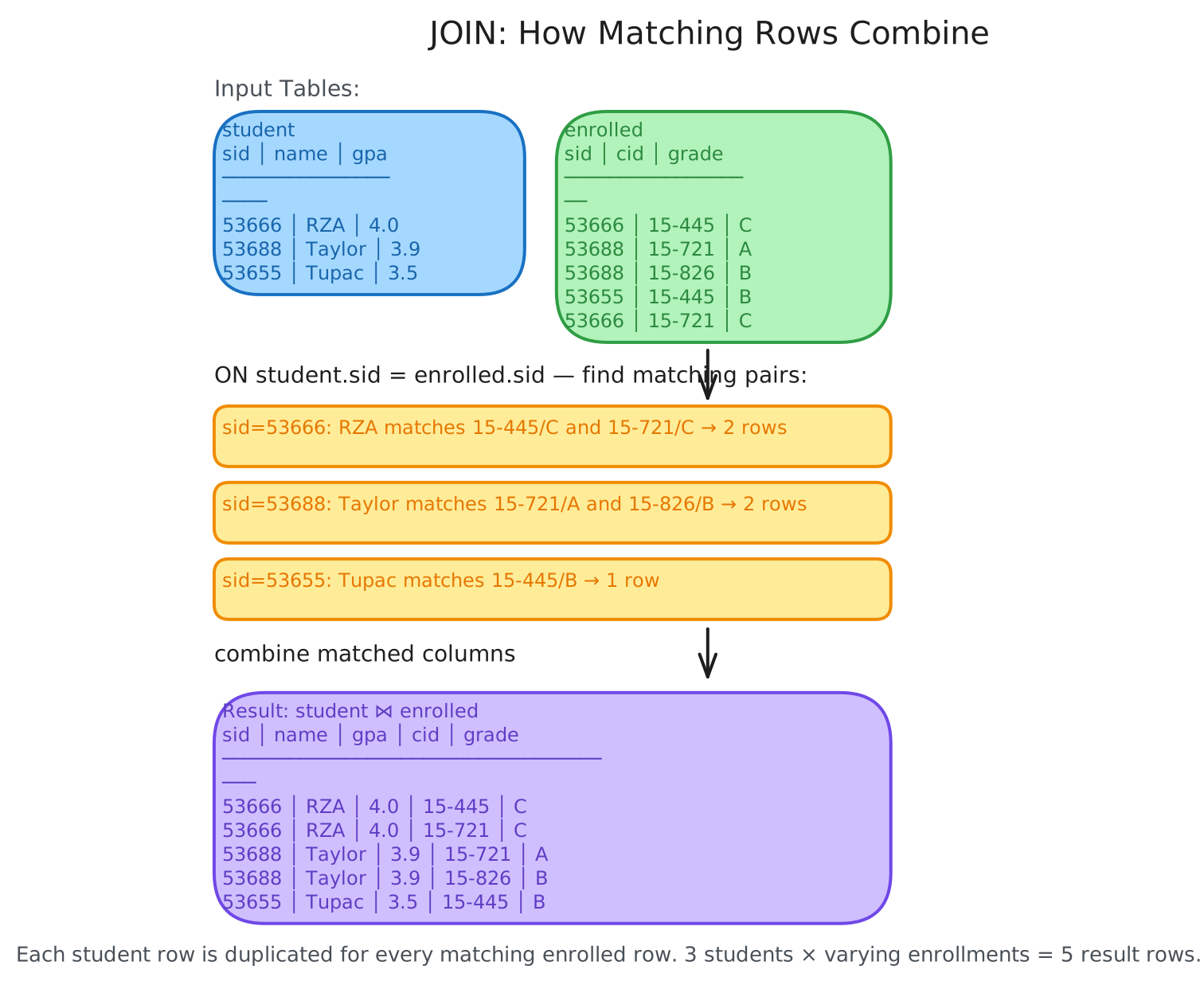
Throughout this post we’ll use a simple university database with three relations:
CREATE TABLE student (
    sid INT PRIMARY KEY,
    name VARCHAR(16),
    login VARCHAR(32) UNIQUE,
    age SMALLINT,
    gpa FLOAT
);

CREATE TABLE course (
    cid VARCHAR(32) PRIMARY KEY,
    name VARCHAR(32) NOT NULL
);

CREATE TABLE enrolled (
    sid INT REFERENCES student (sid),
    cid VARCHAR(32) REFERENCES course (cid),
    grade CHAR(1)
);| sid | name | login | age | gpa |
|---|---|---|---|---|
| 53666 | RZA | rza@cs | 56 | 4.0 |
| 53688 | Taylor | swift@cs | 35 | 3.9 |
| 53655 | Tupac | shakur@cs | 25 | 3.5 |
Aggregates
An aggregate function takes a bag of tuples as input and produces a single scalar value. The five fundamental aggregates are:
AVG(col)— average valueMIN(col)— minimum valueMAX(col)— maximum valueSUM(col)— sum of valuesCOUNT(col)— number of values
Aggregate functions can (almost) only appear in the SELECT output list. Here’s a simple example — counting students with a @cs login:
SELECT COUNT(login) AS cnt
  FROM student WHERE login LIKE '%@cs';
You can also write COUNT(*), COUNT(1), or even COUNT(1+1+1) — they all produce the same result because COUNT simply counts the number of tuples that pass the WHERE filter.
Some aggregates support DISTINCT to deduplicate before computing:
SELECT COUNT(DISTINCT login)
  FROM student WHERE login LIKE '%@cs';
A single SELECT can contain multiple aggregates:
SELECT AVG(gpa), COUNT(sid)
  FROM student WHERE login LIKE '%@cs';
There’s a subtle trap, though: including non-aggregated columns alongside aggregates produces undefined results. If you write SELECT AVG(s.gpa), e.cid without a GROUP BY, the value of e.cid is arbitrary. Most systems will raise an error, but some (like SQLite) silently pick a random value. The SQL:2023 standard introduced ANY_VALUE() to make this explicit:
SELECT AVG(s.gpa), ANY_VALUE(e.cid)
  FROM enrolled AS e JOIN student AS s
    ON e.sid = s.sid;
GROUP BY
The real power of aggregates emerges when you combine them with GROUP BY. This clause partitions tuples into subsets based on one or more columns and then computes aggregates within each subset.
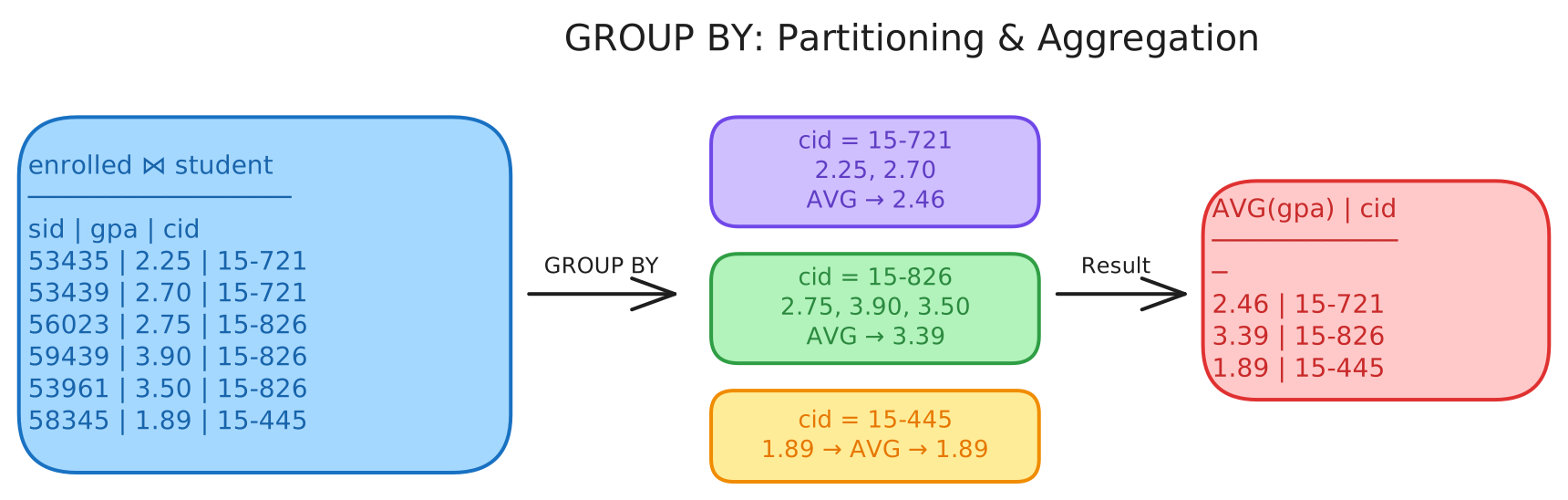
To get the average GPA of students enrolled in each course, you group by the course ID:
SELECT AVG(s.gpa), e.cid
  FROM enrolled AS e JOIN student AS s
    ON e.sid = s.sid
 GROUP BY e.cid;
The rule is straightforward: every non-aggregated column in the SELECT list must appear in the GROUP BY clause. This guarantees that each group has a single canonical value for that column.
Grouping Sets
Sometimes you need multiple levels of aggregation in one query — say, counts by course and grade, counts by course alone, and a grand total. Without GROUPING SETS, you’d have to write three separate queries and UNION ALL them together, forcing the DBMS to scan the data three times.
GROUPING SETS lets you specify all the groupings in one pass:
SELECT c.name AS c_name, e.grade,
       COUNT(*) AS num_students
  FROM enrolled AS e
  JOIN course AS c ON e.cid = c.cid
 GROUP BY GROUPING SETS (
    (c.name, e.grade),
    (c.name),
    ()
 );
This returns rows grouped by course-and-grade, rows grouped by course only (with NULL for grade), and a single grand total row (with NULL for both columns) — all from a single scan of the data.
HAVING
The HAVING clause filters groups after aggregation, the same way WHERE filters rows before aggregation. Think of it as a WHERE clause for GROUP BY.
Suppose you want only courses where the average student GPA exceeds 3.9. You can’t put this condition in WHERE because the average hasn’t been computed yet at that point in the query pipeline. Instead, you use HAVING:
SELECT AVG(s.gpa) AS avg_gpa, e.cid
  FROM enrolled AS e, student AS s
 WHERE e.sid = s.sid
 GROUP BY e.cid
HAVING AVG(s.gpa) > 3.9;
Note that many systems allow you to use the column alias (HAVING avg_gpa > 3.9) as a convenience, but the SQL standard requires you to repeat the aggregate expression in the HAVING body.
String Operations
SQL-92 defines that strings are case-sensitive and use single quotes only. In practice, systems vary — MySQL is case-insensitive by default and allows double quotes, while PostgreSQL and Oracle stick to the standard.
Pattern matching uses the LIKE keyword with two special operators:
%matches any substring (including empty)_matches exactly one character
SELECT * FROM enrolled AS e
 WHERE e.cid LIKE '15-%';

SELECT * FROM student AS s
 WHERE s.login LIKE '%@c_';
The SQL standard also defines SIMILAR TO for regular expression matching, though not all systems support it — many provide their own POSIX-style regex functions instead.
String functions like SUBSTRING, UPPER, and LOWER can be used in both the output list and predicates:
SELECT SUBSTRING(name, 1, 5) AS abbrv_name
  FROM student WHERE sid = 53688;

SELECT * FROM student AS s
 WHERE UPPER(s.name) LIKE 'KAN%';
Concatenation uses the || operator in standard SQL:
SELECT name FROM student
 WHERE login = LOWER(name) || '@cs';
Some systems use + (SQL Server) or CONCAT() as alternatives.
Date/Time Operations
SQL provides operations to manipulate DATE and TIME attributes, usable in both output and predicates. The specific syntax varies wildly across systems — each DBMS tends to have its own functions for extracting parts of dates, computing differences, and formatting output. The key takeaway is that date/time arithmetic exists in every major system, but always check the documentation for your specific DBMS.
Output Control and Redirection
Ordering
Since SQL results are unordered by default, you use ORDER BY to impose a sort:
SELECT sid, name FROM student
 WHERE login LIKE '%@cs'
 ORDER BY gpa DESC;
You can sort by multiple columns to break ties, and even use arbitrary expressions in the ORDER BY clause.
Limiting Results
The SQL standard provides FETCH FIRST for limiting output:
SELECT sid, name FROM student
 WHERE login LIKE '%@cs'
 FETCH FIRST 10 ROWS ONLY;
You can combine it with OFFSET to paginate, and WITH TIES to include all rows that tie with the last row:
SELECT sid, name FROM student
 WHERE login LIKE '%@cs'
 ORDER BY gpa
OFFSET 5 ROWS
 FETCH FIRST 5 ROWS WITH TIES;
Many systems also support the non-standard LIMIT / OFFSET syntax, and SQL Server has TOP.
Output Redirection
You can store query results directly into a new table:
CREATE TABLE CourseIds (
    SELECT DISTINCT cid FROM enrolled
);
Or using the INTO syntax:
SELECT DISTINCT cid INTO CourseIds
  FROM enrolled;
Some systems even allow INTO TEMPORARY to create a temporary table that only lives for the duration of the session.
Nested Queries
Nested queries let you compose more complex logic by invoking one query inside another. The inner query can appear in almost any part of the outer query — in the SELECT list, the FROM clause, or the WHERE clause.
The scope of the outer query is included in the inner query, meaning the inner query can reference attributes from the outer query. The reverse is not true.
Here’s a simple example — getting the names of students enrolled in course 15-445:
SELECT name FROM student
 WHERE sid IN (
    SELECT sid FROM enrolled
     WHERE cid = '15-445'
 );
You can also use subqueries in the SELECT list:
SELECT sid,
       (SELECT name FROM student AS s
         WHERE s.sid = e.sid) AS name
  FROM enrolled AS e;
Nested Query Operators
SQL provides several operators for working with subquery results:
ALL— the expression must hold for every row returned by the subquery.ANY— the expression must hold for at least one row.IN— equivalent to= ANY().EXISTS— true if the subquery returns at least one row (without comparing to a specific attribute).
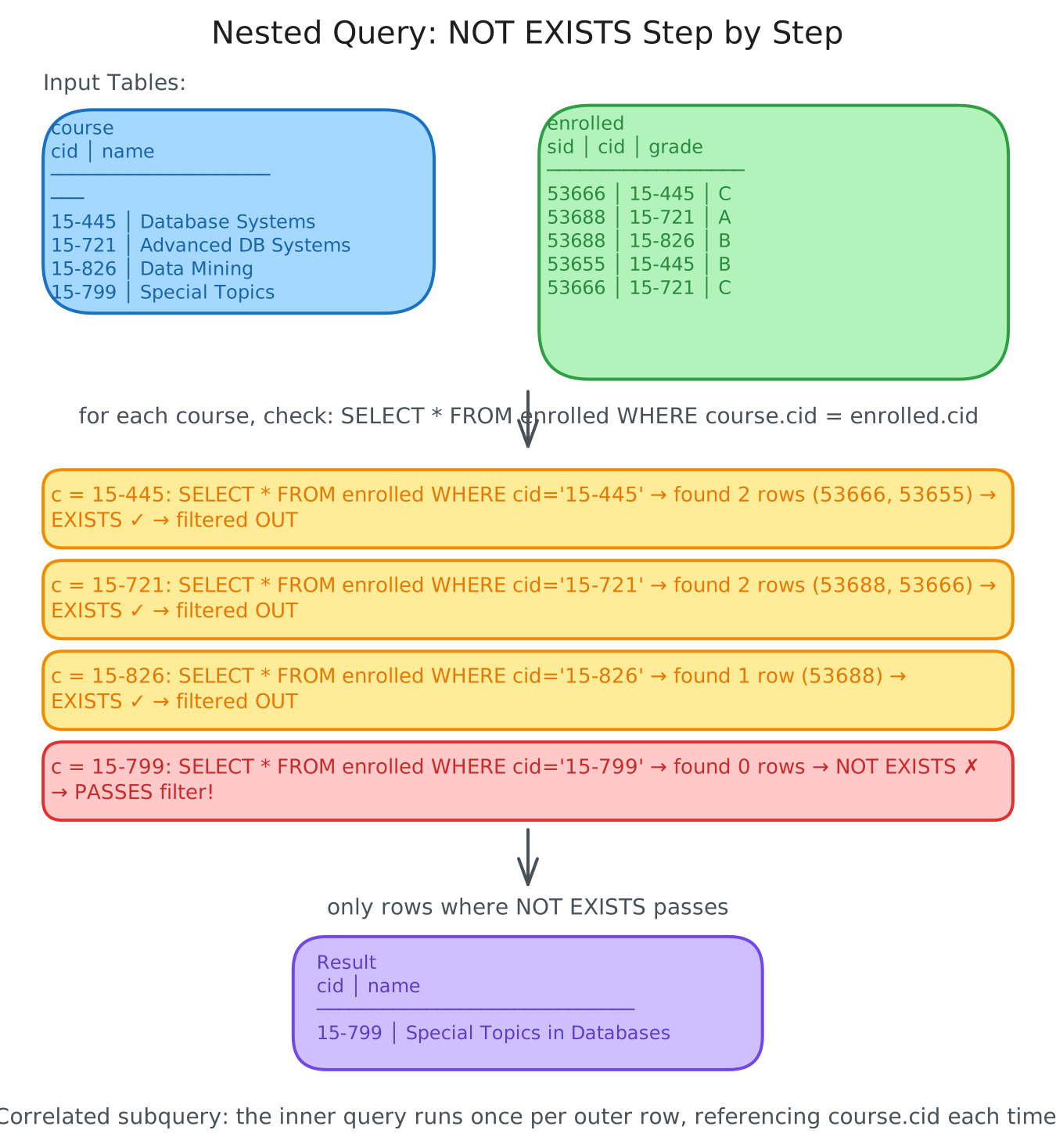
A powerful example is finding courses with no enrolled students using NOT EXISTS:
SELECT * FROM course
 WHERE NOT EXISTS (
    SELECT * FROM enrolled
     WHERE course.cid = enrolled.cid
 );
This correlates the inner and outer queries — for each course, the subquery checks whether any enrollment records exist. If none do, the course passes the filter.
Multiple Approaches to the Same Problem
One of the beautiful things about SQL is that there are often multiple ways to express the same query. Consider finding the student with the highest ID who is enrolled in at least one course:
-- Using IN with MAX
SELECT sid, name FROM student
 WHERE sid IN (SELECT MAX(sid) FROM enrolled);

-- Using ORDER BY with FETCH
SELECT sid, name FROM student
 WHERE sid IN (
    SELECT sid FROM enrolled
     ORDER BY sid DESC FETCH FIRST 1 ROW ONLY
 );

-- Using a derived table join
SELECT student.sid, name
  FROM student
  JOIN (SELECT MAX(sid) AS sid FROM enrolled) AS max_e
    ON student.sid = max_e.sid;
All three produce the same result. The DBMS’s query optimizer will typically choose an efficient execution plan regardless of which form you use.
Lateral Joins
The LATERAL operator allows a nested query to reference attributes from other nested queries that precede it in the FROM clause. You can think of it like a for-loop: for each tuple in the preceding table, invoke a subquery.
A simple example:
SELECT * FROM
    (SELECT 1 AS x) AS t1,
    LATERAL (SELECT t1.x + 1 AS y) AS t2;
This returns x = 1, y = 2. The key is that t2 can reference t1.x — something a normal subquery in FROM cannot do.
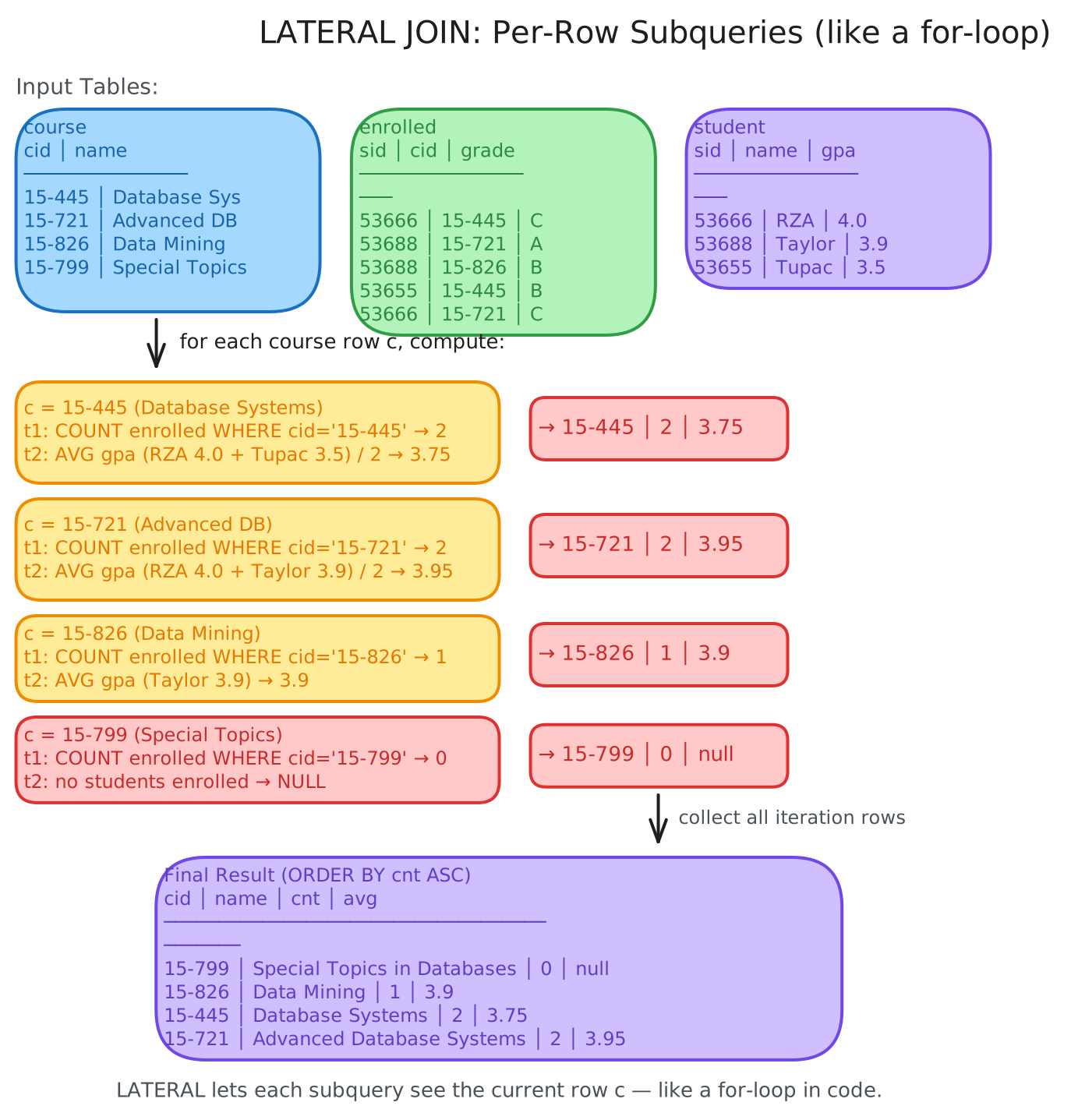
Here’s a more practical example: calculating the number of enrolled students and their average GPA for each course, sorted by enrollment count:
SELECT * FROM course AS c,
    LATERAL (SELECT COUNT(*) AS cnt
               FROM enrolled
              WHERE enrolled.cid = c.cid) AS t1,
    LATERAL (SELECT AVG(gpa) AS avg
               FROM student AS s
               JOIN enrolled AS e ON s.sid = e.sid
              WHERE e.cid = c.cid) AS t2
ORDER BY cnt ASC;| cid | name | cnt | avg |
|---|---|---|---|
| 15-799 | Special Topics in Databases | 0 | null |
| 15-826 | Data Mining | 1 | 3.9 |
| 15-445 | Database Systems | 2 | 3.75 |
| 15-721 | Advanced Database Systems | 2 | 3.95 |
For each course, the first lateral subquery counts its enrollments and the second computes the average GPA of enrolled students. Courses with zero enrollments still appear (with NULL for the average) because the lateral join processes every course row.
Common Table Expressions
Common Table Expressions (CTEs) provide an alternative to nested queries and temporary tables. A CTE defines a temporary named result set that lives only for the duration of a single query — think of it as a WITH clause that makes complex queries readable and composable.
WITH cteName (col1, col2) AS (
    SELECT 1, 2
)
SELECT col1 + col2 FROM cteName;
You can bind output column names before the AS keyword, and a single query can declare multiple CTEs:
WITH cte1 (col1) AS (SELECT 1),
     cte2 (col2) AS (SELECT 2)
SELECT * FROM cte1, cte2;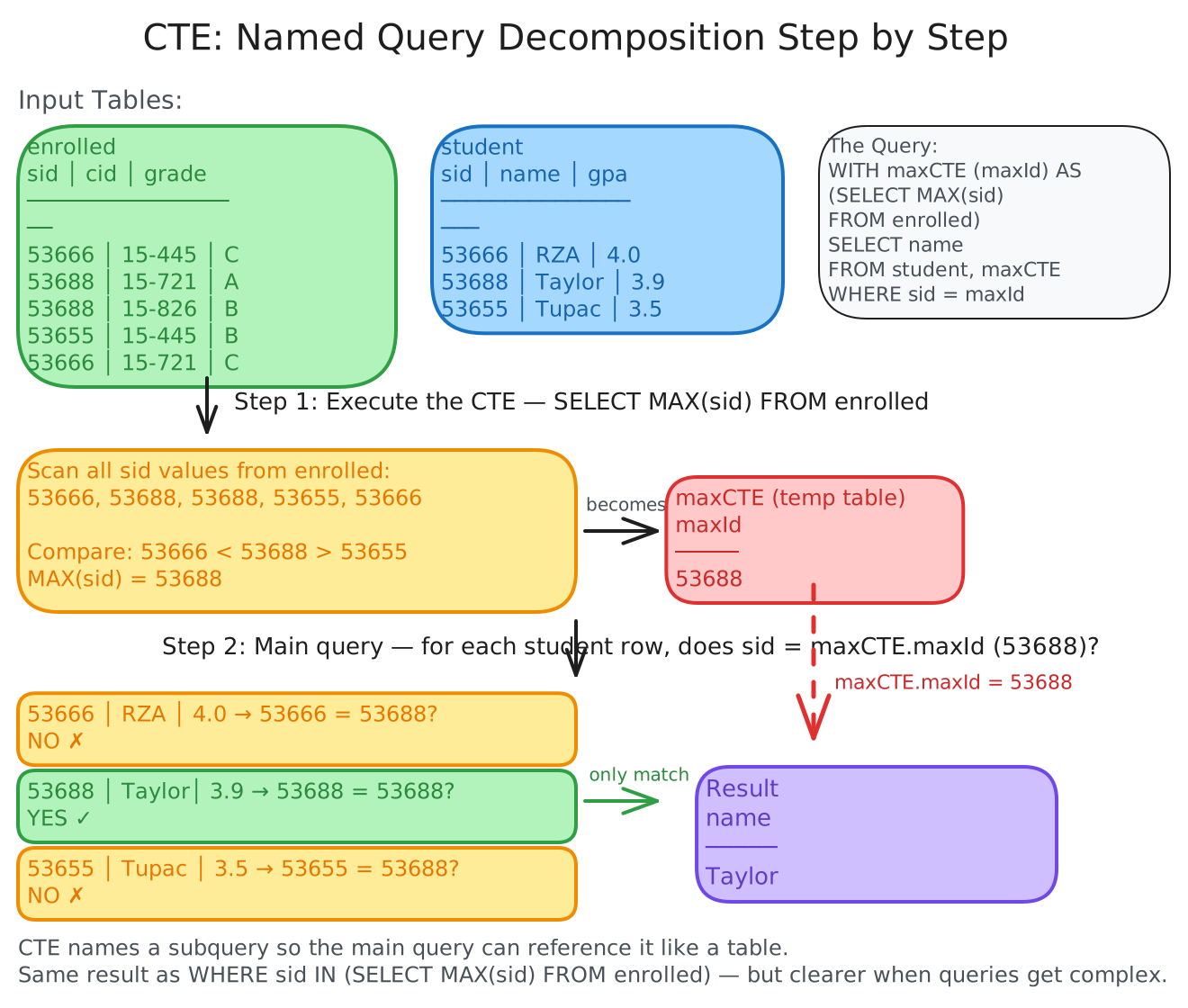
Here’s the earlier “highest enrolled student ID” query rewritten with a CTE — much cleaner:
WITH maxCTE (maxId) AS (
    SELECT MAX(sid) FROM enrolled
)
SELECT name FROM student AS s
  JOIN maxCTE ON s.sid = maxCTE.maxId;
Recursive CTEs
Adding the RECURSIVE keyword after WITH allows a CTE to reference itself. This enables recursion in SQL — and with recursive CTEs, SQL is provably Turing-complete, meaning it’s as computationally expressive as general-purpose programming languages (if a bit more cumbersome).
A classic example: printing the numbers 1 through 10:
WITH RECURSIVE cteSource (counter) AS (
    (SELECT 1)
    UNION
    (SELECT counter + 1 FROM cteSource
      WHERE counter < 10)
)
SELECT * FROM cteSource;
The first branch of the UNION provides the base case (1), and the second branch recursively increments the counter until the termination condition (counter < 10) is met.
Window Functions
Window functions perform calculations across a set of tuples related to the current row — similar to aggregates, but without collapsing the rows into a single output. Each row retains its identity while gaining access to aggregate-like computations over its “window.”
The general syntax is:
SELECT FUNC_NAME(...) OVER (...)
  FROM tableName;
Window functions support all the standard aggregate functions (AVG, SUM, COUNT, etc.) plus special functions:
ROW_NUMBER()— assigns a sequential number to each rowRANK()— assigns the order position, with ties sharing the same rank
A simple example — numbering every enrollment row:
SELECT *, ROW_NUMBER() OVER () AS row_num
FROM enrolled;| sid | cid | grade | row_num |
|---|---|---|---|
| 53666 | 15-445 | C | 1 |
| 53688 | 15-721 | A | 2 |
| 53688 | 15-826 | B | 3 |
| 53655 | 15-445 | B | 4 |
| 53666 | 15-721 | C | 5 |
PARTITION BY
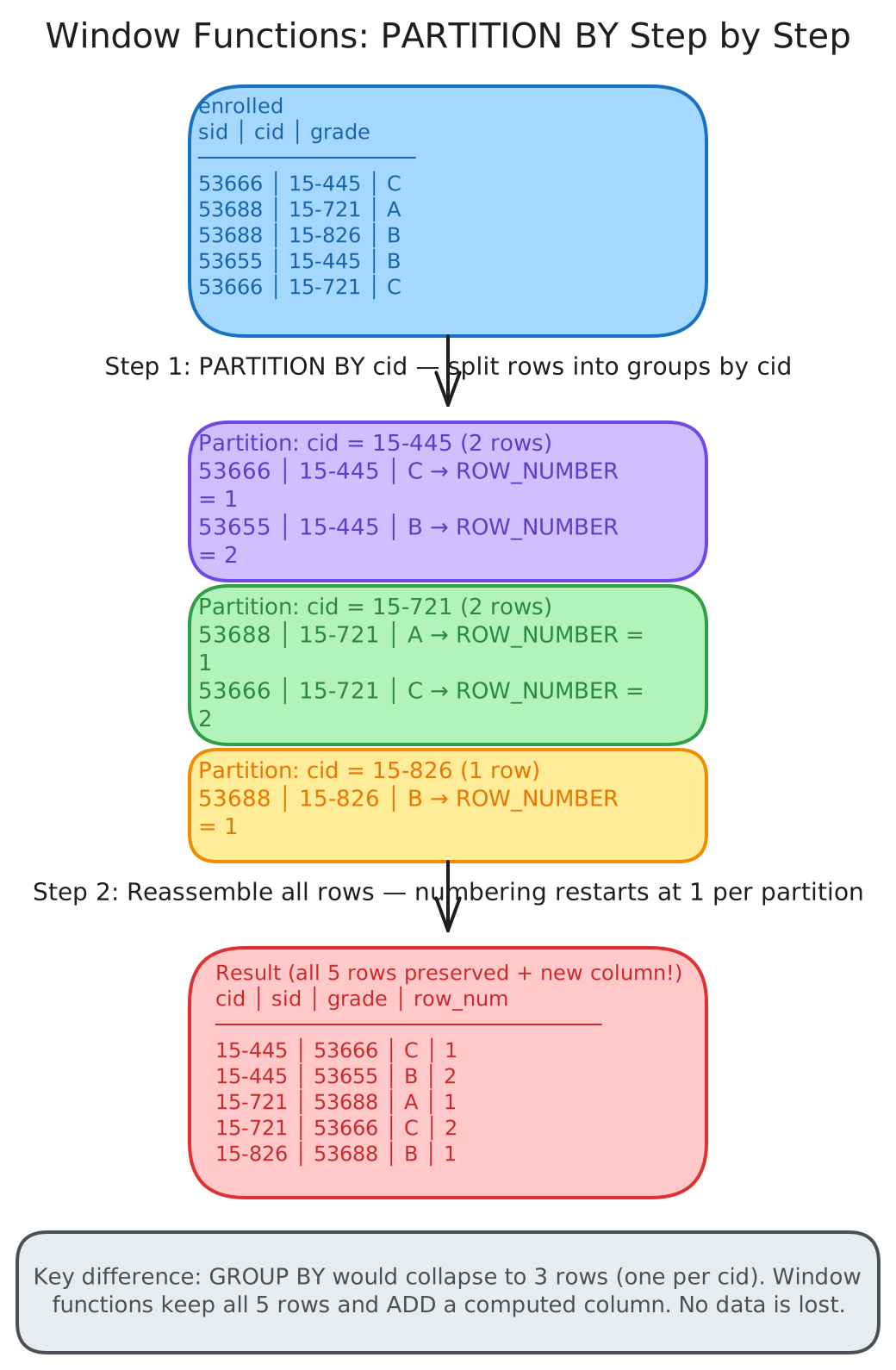
The OVER clause specifies how to group tuples for the window computation. Use PARTITION BY to define the groups — each group gets its own independent numbering/ranking:
SELECT cid, sid,
       ROW_NUMBER() OVER (PARTITION BY cid)
  FROM enrolled
ORDER BY cid;| cid | sid | row_number |
|---|---|---|
| 15-445 | 53666 | 1 |
| 15-445 | 53655 | 2 |
| 15-721 | 53688 | 1 |
| 15-721 | 53666 | 2 |
| 15-826 | 53688 | 1 |
You can also put an ORDER BY inside the OVER clause to control the order within each partition. An important detail: the DBMS computes RANK after the window function sorting, but computes ROW_NUMBER before the sorting.
Practical Example: Finding the Second-Highest Grade
Window functions shine when you need ranked results within groups. To find the student with the second-highest grade in each course:
SELECT * FROM (
    SELECT *, RANK() OVER (PARTITION BY cid
                           ORDER BY grade ASC) AS rank
      FROM enrolled
) AS ranking
WHERE ranking.rank = 2;
The inner query partitions enrollments by course, ranks them by grade (ascending because grades are letters: A < B < C), and the outer query filters for rank 2. This would be far more complex without window functions — you’d need correlated subqueries or self-joins.
Conclusion
SQL is far richer than the basic SELECT ... FROM ... WHERE pattern most people learn first. Aggregates with GROUP BY and HAVING let you summarize data at any granularity. Nested queries and lateral joins give you the composability to express complex logic in a single statement. CTEs make that complexity readable and maintainable. And window functions unlock analytical queries — rankings, running totals, moving averages — without losing row-level detail.
The guiding principle remains the same as it was in 1972: you declare what you want, and the DBMS figures out how to get it efficiently. The richer your SQL vocabulary, the more you can push down to the optimizer — and the less application code you have to write and maintain.